



WhatsApp Business API · Official API

WhatsApp bulk messaging and customer chats in one place

Send personalized bulk messages and track delivery and replies. Continue conversations in AnyLinga with automatic translation.

7 days free. No credit card required.

AnyLinga Inbox conversation list and an open chat with a translated message
Completed WhatsApp Business API broadcast: sent, delivered, read and replied
Chats and broadcasts without a CRM

From a broadcast to a customer conversation

Send a WhatsApp Business API broadcast, then continue chatting with customers who reply in AnyLinga web chat.

  1. 1Send a broadcast
    Choose recipients and a Meta-approved WhatsApp Business API template.
  2. 2Receive a reply
    The customer's reply arrives in web chat as a regular incoming message.
  3. 3Continue the conversation
    Reply in the same conversation and hand it over to a teammate if needed.
Free setup when you pay for your first monthWe'll help with setup or migration from another service.

Reach customers on WhatsApp

Send WhatsApp Business API broadcasts using Meta-approved templates to up to 10,000 recipients per broadcast. Template variables are filled in for each recipient.

Creating a broadcast: selecting recipients and a WhatsApp Business API template
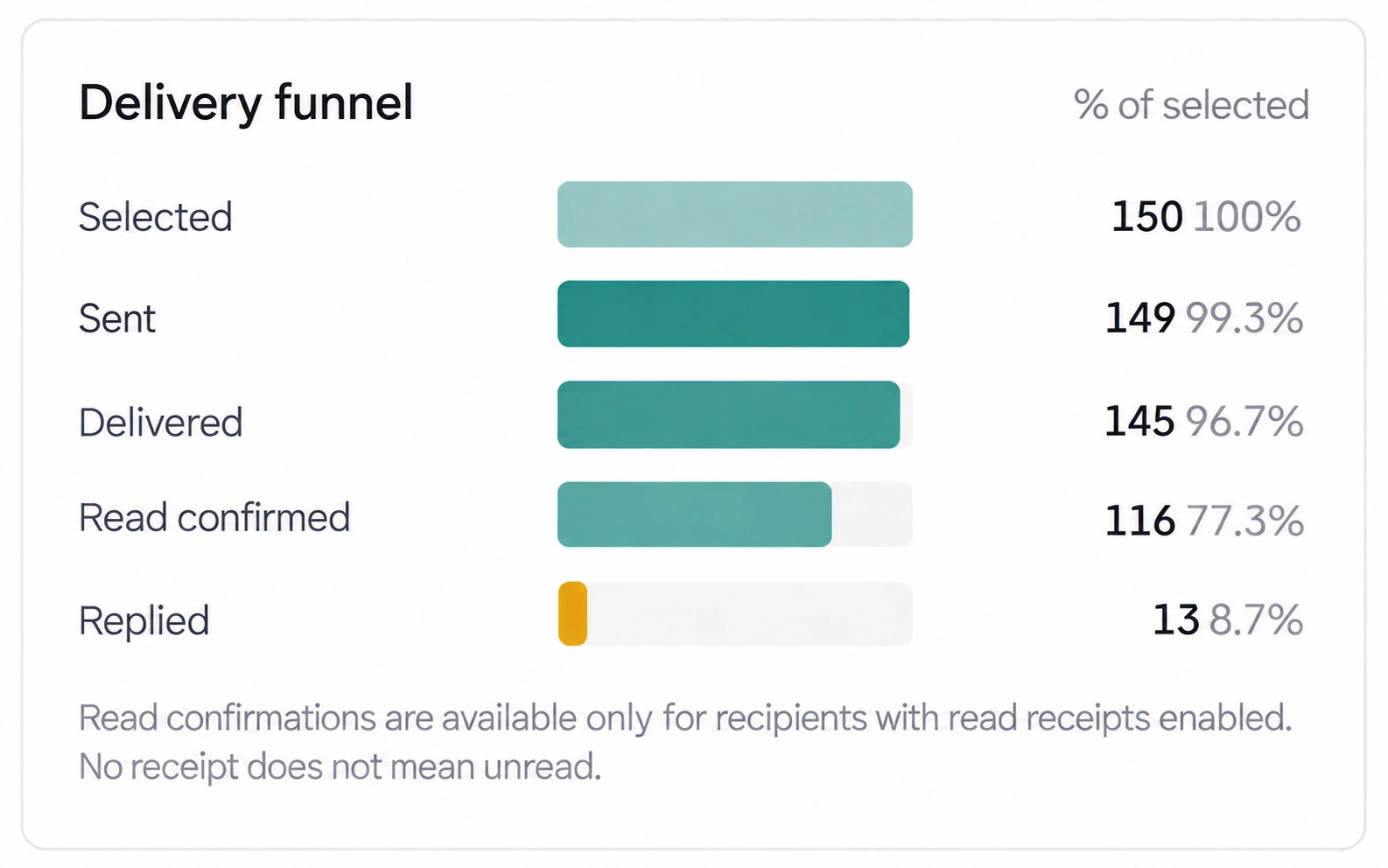
Broadcast funnel: selected, sent, delivered, read and replied
  • Choose your recipientsUpload a CSV with phone numbers and names and confirm recipients' consent, or select customers from one-to-one web chat conversations by tags and channels.
  • Respect opt-outsUse an unsubscribe button. Recipients who unsubscribe are added to a suppression list.
  • Review the resultsThe report shows the funnel from recipient selection to replies, along with unsubscribes and cost per reply. Reads are counted only for recipients with read receipts enabled.

Bulk WhatsApp messaging: features and pricing

Customers write in their language. You reply in yours.

Incoming messages are translated into your workspace's working language, and your replies into the customer's language. Translation works in AnyLinga web chat and Kommo.

  • The language is rememberedAnyLinga automatically detects the customer's language and remembers it for the conversation. You can also set it manually.
  • Review before sendingSee what the customer will receive before you send. View the original alongside the translation or send a message without translation.
  • Templates stay unchangedWhatsApp templates are sent as they are, without translation.

Already using a CRM? Connect AnyLinga

Connect WhatsApp, Telegram, Instagram and Facebook Messenger to Kommo to reply to customers from the deal card. Each workspace connects to either AnyLinga web chat or Kommo, not both at once.

Choose your CRM
  • Conversations in the dealIncoming messages create deals in Kommo. Your team replies from the deal card, where the conversation history is also stored.
  • Settings for each channelSet an assignee, pipeline and stage for each channel.
  • Broadcasts by segmentSelect recipients in Kommo by pipeline, stage, tags and assignee.

Connect your automation and AI bots

With AnyLinga Connect, your n8n workflow or HTTP-accessible agent receives messages and sends replies to chats. AnyLinga handles message delivery; you choose the AI, model and data.

  • Your workflowConnect an n8n workflow or your own HTTP-accessible agent.
  • Replies through AnyLingaYour bot receives messages and replies to customers through an AnyLinga channel.
  • Set it up yourselfThe subscription does not include a ready-made AI bot. Set up your own using the API documentation and n8n connection example. AnyLinga Connect for Kommo requires Kommo Advanced or higher.
API documentation n8n connection example

Start by connecting a channel

  1. 1Create an account Sign up with your email and verify your address.
  2. 2Connect a channel Connect a WhatsApp number, WhatsApp Business API, Telegram or another supported channel.
  3. 3Get started Choose AnyLinga web chat or Kommo and start chatting or sending broadcasts.
Try it free

We'll help you get started

Setup is on us

When you pay for your first month of AnyLinga

We'll connect your channels, configure the basics, and help you get started. We'll check migration options in advance.

  • Channels
  • Basic setup
  • Migration help

You pay for the subscription.
Standard setup is free.

Three steps to get started

  1. 1
    We'll review your needsWe'll understand your goals and check connection options, including migration from another service.
  2. 2
    You pay for the first monthYou subscribe to AnyLinga.
  3. 3
    We'll connect and testWe'll set up your channels, configure the basics, and make sure everything works.

Choose how you want to work

Choose a plan for your needs. Connected channels are billed separately.

CRM integration

Integration

$0per month

For teams that chat with customers in Kommo.

  • Messaging channels in Kommo
  • Chat from the deal card
  • Automatic translation
Broadcasts

Campaigns

$19per month

For teams that send WhatsApp Business API broadcasts.

  • Everything in Integration
  • WhatsApp Business API broadcasts
  • Broadcast reports
Web chat

Workspace

$39per month

For teams that chat and send broadcasts without a CRM.

  • AnyLinga web chat
  • WhatsApp Business API broadcasts
  • Automatic translation

What makes up your total

Total = plan + each connected channel at $21 per month.

  • Translation is included in the channel price: 3,000 translations per month with the first channel and another 1,000 with each additional channel. One translated message uses one credit. Unused credits do not roll over.
  • WhatsApp Business API messages are billed separately at Meta's rates. The cost depends on the template category and country.
  • You can buy packs of 2,000, 10,000 or 50,000 translation credits, valid for one year.
  • The number of team members does not affect the price.
Message cost calculator
Try it free

7 days free. No credit card required.
Questions

Can I work without a CRM?

Yes. Use AnyLinga web chat in your browser for customer conversations. For WhatsApp Business API broadcasts, upload a CSV with phone numbers and names and confirm recipients' consent, or select customers from one-to-one web chat conversations.

Which channels support broadcasts?

Broadcasts are available only through WhatsApp Business API and only with Meta-approved templates. Each broadcast can have up to 10,000 recipients.

Where do broadcast replies arrive?

Replies arrive as regular incoming messages in AnyLinga web chat if web chat is connected, or in Kommo if the CRM is connected. You can then continue the conversation with the customer.

Can I use web chat and Kommo at the same time?

No. Each workspace connects to either AnyLinga web chat or Kommo.

What does the trial include?

All features are available for 7 days, including broadcasts and web chat. You can connect up to 5 channels and use 1,000 translations. No card required.

How much does AnyLinga cost?

The monthly cost combines your plan and channels: Integration is $0, Campaigns is $19 and Workspace is $39, plus $21 for each connected channel. A channel is one connection, such as a WhatsApp number, Telegram bot or Instagram account. The number of team members does not affect the price. Save 10% when paying for 6 months or 16.7% when paying for a year.

What is billed separately?

WhatsApp Business API messages are billed separately at Meta's rates, which depend on the template category and country. If you need more translations than your allowance includes, you can buy a translation credit pack.

How do I cancel my subscription?

You can cancel your subscription at any time. After cancellation, it stays active until the end of the paid period.

Start using AnyLinga

On your own—or with our help.

Try it free
Need help with setup or migration?

Discuss setup

What you need