Most builders who try to connect an AI agent to Kommo chats hit the same wall. The n8n flow is wired up, the agent reads the lead, drafts a reply — and then, on the step that sends it to the chat, an error comes back: the send failed. The message never reaches WhatsApp; the send request is rejected. What's confusing is that at first it looks like a setup or access problem — as if the credentials are wrong.
The short answer: you've run into the difference between reading CRM data and sending a chat message. These are two different Kommo mechanisms, and the second one is gated by channel registration. Let's go through it in order — with Kommo's docs behind every claim — and show a compatible way to make replies arrive.
Can an n8n agent reply in Kommo chats? Reading — yes, sending — not on its own
Straight to the point: n8n works beautifully with CRM data — leads, contacts, deals, custom fields. You can read and write them all day. But sending a chat message is an entirely different system, and it's called amojo.
Kommo's official n8n integration says exactly this implicitly: it's about CRM data, not messaging. Kommo's n8n integration overview describes operations on CRM entities — creating and updating leads, contacts, tasks. There's no "send a reply into a live WhatsApp chat" there, because chats don't live in the CRM API; they live in the amojo transport.
That's where the beginner's confusion comes from. You see working Kommo nodes in n8n, you wire up "get lead → think → reply," and the first half runs. But the last step — "post the reply into the chat" — breaks with an error: the send request to amojo is rejected, and you see that the send failed. The trap is that the error looks like an access or setup problem — people spend hours re-checking tokens, credentials and agent logic, when that's not it. The reason is that you don't have a registered channel: without one there's no valid signature and no write permission to amojo — the transport layer your n8n simply can't reach.
It helps to keep a simple map of the rest of the breakdown in mind. Coming up in this article: what exactly that gate is and why you can't pass through it on your own (section 2), why even the official n8n template stumbles here for new builders, how a pre-registered bridge gets around the problem while keeping the intelligence on your side (section 3), the step-by-step build (section 4), the contract on the n8n side (section 5), and an honest comparison with the alternatives (section 6). In short — you're not fixing the agent, you're obtaining access to the transport.
In short
An n8n agent in Kommo can read and write CRM data — leads, contacts, fields — through the official integration. But sending a reply into a chat goes through amojo, a separate Kommo message transport that the official n8n integration doesn't cover. That's why the agent "sees" the lead, but its reply never reaches WhatsApp.
Why your template doesn't send the reply: the amojo channel gate
amojo is Kommo's chat message transport. To post a message into a chat you have to call https://amojo.kommo.com/v2/origin/custom/{scope_id} with an X-Signature header — a SHA1 of the request body signed with the channel secret. The exact scheme is described in Kommo's Chats API authorization and headers docs. Without a correct signature and a valid scope_id in the URL, the request won't go through.
And you only get the scope_id and the secret after registering a channel. And here's the gate: as of 2026, chat channel registration goes through a request to Kommo technical support (review usually 1–3 business days), not through an open self-service form. In other words, the data each amojo request is signed with is physically impossible to obtain by simply clicking a button in your account.
"But there's an official n8n template and a Kommo n8n guide, right?" — yes, there are, and to be fair: they deserve to be acknowledged, not pretended away. There's both a ready-made n8n workflow (2841) "Connect AI to any chats in Kommo" and an official Kommo guide for setting up n8n. They describe the flow logic correctly. But the step that injects the reply into the chat assumes an already-registered channel that you're expected to have in hand. That missing link is exactly what new builders don't have — the template draws a flow that runs into a gate you can no longer open from scratch.
From our own experience: when AnyLinga registered its channel in early 2026, public self-service for amojo was already closed — registration came through a support request with a multi-day review. We're not claiming any "shutdown" date for anything, and we're not saying Kommo "banned n8n": you can connect external AI, there's a sanctioned path. What got closed is specifically self-service channel registration. That's an important distinction, because the web is full of guides written for the old behavior, where scope_id was obtained through self-service — they're technically correct for someone who already has a channel, but misleading for anyone starting from scratch today.
Why does such a gate exist at all? amojo isn't just "another endpoint" — it's the transport that carries real customers' messages on WhatsApp, Instagram and Telegram. A registered channel is a trusted sender with a signature Kommo can verify. So gating registration through support, inconvenient as it is for a builder, is logical: it stops arbitrary code from writing into chats under someone else's name. The takeaway for a practitioner is simple — either go through registration yourself (and maintain it), or connect through someone who is already a trusted sender.
Here's what an n8n flow can and can't do against Kommo without a registered channel:
- Can: read and update leads, contacts, deals and custom fields through the CRM API.
- Can: create tasks, change statuses, apply tags, trigger webhooks.
- Can't: send a message into a WhatsApp / Instagram / Telegram chat through an amojo channel that hasn't passed Kommo moderation — you need a registered and approved channel, and only then will a signed request with a valid
scope_id and secret be accepted.
- Can't: obtain the
scope_id and the secret without going through channel registration via Kommo support.
There's also a second sanctioned path to replying from the outside — the widget_request route in Salesbot, described in Kommo's private chatbot integration docs. It, too, relies on a widget and a channel. That's exactly what the bridge below uses.
The amojo gate, in plain words
To send a reply into a Kommo chat, you have to post it into amojo at amojo.kommo.com/v2/origin/custom/{scope_id} with an X-Signature header (SHA1 signed with the channel secret). The scope_id and the secret are only issued after registering a channel, which in 2026 goes through a request to Kommo support, not self-service.
The compatible fix: a pre-registered bridge (how AnyLinga Connect works)
The simplest way to get around the gate is not to storm it alone for every integration, but to go through someone whose channel is already registered. The solution is AnyLinga Connect: AnyLinga already owns a registered amojo channel. It sits in Kommo's message flow as an approved widget, hands the inbound message to your n8n agent, and then returns the agent's reply back to the chat through its registered channel.
An important positioning note (and it matters): AnyLinga is a transport / gateway. The intelligence is your n8n agent: your model, your prompts, your tools. n8n never touches amojo or the Kommo API directly — that's exactly what keeps the design clean and compatible. AnyLinga doesn't "reply with AI" and doesn't decide what to say to the customer; it delivers there and back.
A bonus in the same pipeline: optional real-time translation. The customer's message can be translated for your agent, and the agent's reply translated back into the customer's language. The same logic as in translating WhatsApp conversations in the same pipeline, only now layered on top of your AI agent.
Here's how a message travels through the bridge, from the chat to the agent and back:
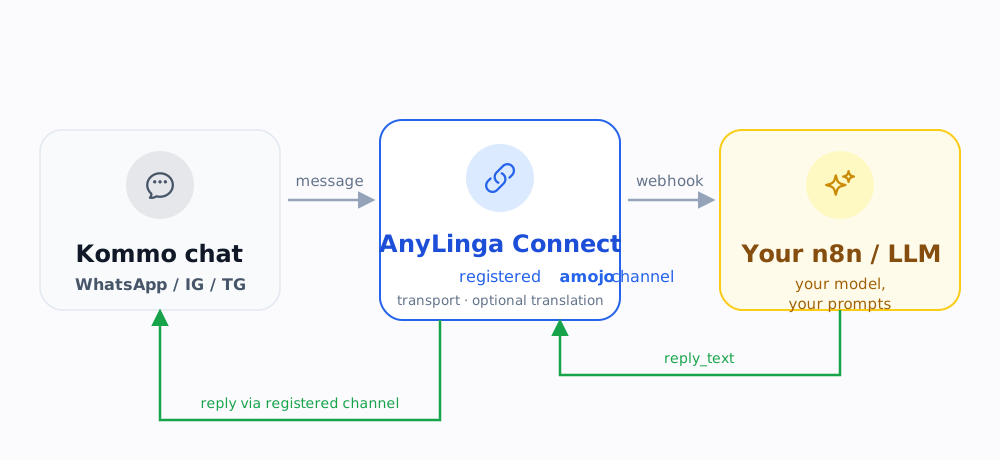
Your n8n never touches Kommo or amojo — the chat-facing part is handled by AnyLinga's registered channel.
What this bridge is
AnyLinga Connect is a pre-registered Kommo amojo channel that routes inbound chat messages to your own n8n agent and returns its reply back to the chat. AnyLinga is the transport; the intelligence stays yours. Your n8n doesn't register a channel, doesn't call amojo and doesn't touch the Kommo API — the chat-facing part is handled by AnyLinga's registered channel.
Step by step: connecting an n8n agent through AnyLinga Connect
The build takes minutes, not days of registration. Here's the whole route:
- Kommo Advanced plan or higher. The custom widget and WebSDK the bridge runs on require the Advanced plan or above. That's a baseline platform requirement for widgets.
- Install the AnyLinga widget from the Marketplace and open its settings. Connection is one-click via OAuth — no channel registration is needed on your side.
- In AnyLinga, verify the Kommo account is connected correctly, and add the messenger (or several) — WhatsApp, Instagram, Telegram, etc. — that your customers will use to message your AI agent.
- In the AnyLinga settings, paste your n8n Webhook URL plus a secret; choose sync or async mode; (optionally) enable inbound and outbound translation.
- Build the n8n side from the AnyLinga Connect template (details in the next section).
- Test with a real WhatsApp message and watch the reply arrive in the chat.
A few practical notes on the steps. First, verify the Kommo account is connected correctly and that the messengers you need (WhatsApp, Instagram, Telegram, etc.) are added in AnyLinga — that's exactly how inbound messages will reach your agent. The secret you paste next to the Webhook URL is used to sign the requests (HMAC) — it confirms that the POST to your n8n really came from AnyLinga, and not from someone who guessed your webhook URL.
One practical ceiling is Kommo's reply window: the chat doesn't wait for a reply forever. If your agent thinks for a while (heavy reasoning chains, calls to external APIs, knowledge-base lookups), use the async path and a short fallback reply along the lines of "one moment, checking…" while the agent prepares the full answer. Lightweight agents that respond in a couple of seconds will be fine with the synchronous fast path — and then the whole chain is simpler: a request comes in, the agent replies in the same HTTP response.
If you're moving off manual translation or setting up the Kommo connection for the first time, the no-code Kommo setup for AnyLinga is useful — it shows the basic no-code widget install you then add the agent step on top of. And to gauge how much time manual work eats up that an agent can take off your team, the breakdown in the math of manual translation helps.
The n8n side: webhook in, reply out (sync or async)
On the n8n side it's simpler than it looks. AnyLinga POSTs to your n8n Webhook trigger with a clear contract, your agent thinks, and returns text. There's no amojo work on your side at all.
The gateway contract looks like this:
AnyLinga → your n8n
message_text, translated_text?, lead_id / contact_id, lang, conversation_id, correlation_id, callback_url (HMAC-signed)
your n8n → AnyLinga
reply_text, handoff_to_human?, set_status? — sync (Respond to Webhook) or async (callback)
There are two ways to reply:
- Synchronous fast path. The
Respond to Webhook node returns reply_text right in the same HTTP response. Good for simple agents that fit within Kommo's reply window.
- Asynchronous path. For heavy agents: n8n accepts the request, replies instantly, and then the finished answer is sent via an HTTP POST back to
callback_url with the same correlation_id — so AnyLinga can match the reply to the right conversation.
The return format is minimal: a required reply_text plus optional handoff_to_human (hand the conversation to a human) and set_status (change the deal status). correlation_id and callback_url cover the async scenario and the HMAC signature.
The key point: n8n only does "accept → think → return text." It never registers a channel, never calls amojo and never touches the Kommo API. The entire chat-facing part is handled by AnyLinga's registered channel. That's the boundary that keeps your automation clean.
A convenient starting point is the ready-made AnyLinga Connect template for n8n — webhook in, your agent in the middle, reply out.
The boundary of responsibility
On the n8n side the agent only does "accept → think → return text." It never registers a channel, never calls amojo and never touches the Kommo API directly. Delivering the reply into the chat through the registered channel is AnyLinga's job — that separation is exactly what keeps the integration compatible with Kommo's rules.
AnyLinga Connect vs DIY vs Composio / Agenthost / Latenode
The bridge isn't the only option. An honest comparison of what's on the market, and where each choice makes sense:
| Approach | amojo channel | In-pipeline translation | Overhead |
|---|
DIY
your channel + your widget |
You register it yourself via a support request (per integration) |
No — you build it separately |
Full control, but real costs: registration, widget, maintenance |
Composio (Kommo MCP) / Agenthost / Latenode
general-purpose |
Run into the same amojo gate |
No, not tailored for LatAm |
They connect external AI, but you still need the channel; not specialized for multilingual sales |
AnyLinga Connect
pre-registered channel + widget |
Pre-registered — no need to pass the gate |
Yes — translation in the same pipeline |
Minimal: native Kommo widget, focus on ES/PT/LatAm |
The key idea of the table: general-purpose tools like Composio, Agenthost or Latenode solve "connect external AI to Kommo" at the orchestration level, but they don't remove the amojo gate — you still need a channel to send into chats, and they don't go through its registration for you. On top of that, they're not tailored for multilingual sales: there's no in-pipeline translation and no focus on the LatAm market (ES/PT). DIY gives you maximum control, but turns you into the one registering and maintaining the channel and widget — for every integration.
Who it suits: a single internal bot on one account, where a one-time hassle with registration isn't a big deal — DIY might make sense. For agencies, multilingual teams, and anyone who needs fast delivery without registering a channel per client — a pre-registered bridge like AnyLinga is usually cheaper in total effort: you don't pass the gate, and you get in-pipeline translation right away.
The business side of the decision — how an agency can build a client service on top of this — comes down to the economics and the delivery model. If you deliver this for clients, AnyLinga Connect for agencies is built for exactly that.
