
How to connect a Telegram bot to Kommo
To connect a Telegram bot to Kommo, add its token in AnyLinga. Customer conversations and Telegram group chats will arrive in Kommo through the connected bot.
A bot cannot send the first message: the customer must start the conversation. If you need to use an employee's own account, connect a personal account.
What you'll need
- Access to AnyLinga and your Kommo account.
- A bot token from @BotFather.
- To connect groups, permission to add the bot to a group and grant it admin rights.
Where to connect a Telegram bot
1. Open the channel list
- Go to Channels and open the Direct tab.
- Find Telegram bot under Incoming Message Sources.
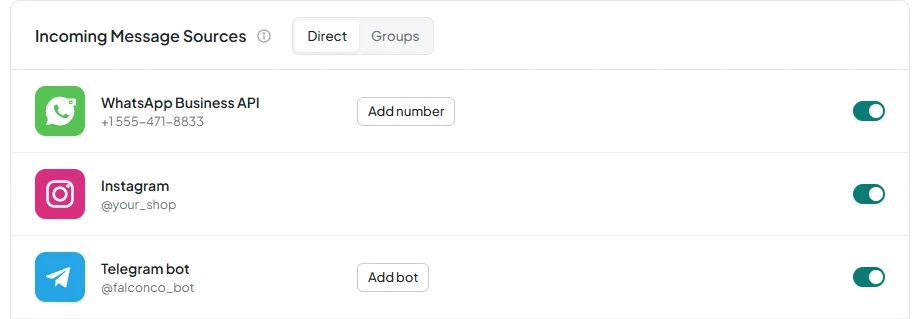
Each bot is a separate channel that costs $21 per channel per month on any plan. Channel connections do not depend on your plan. During the 7-day trial, you can connect up to 5 channels. See pricing for details.
How to connect a Telegram bot
2. Create a bot in Telegram
- Open @BotFather in Telegram and create a bot.
- Copy the token provided.
3. Connect the bot in AnyLinga
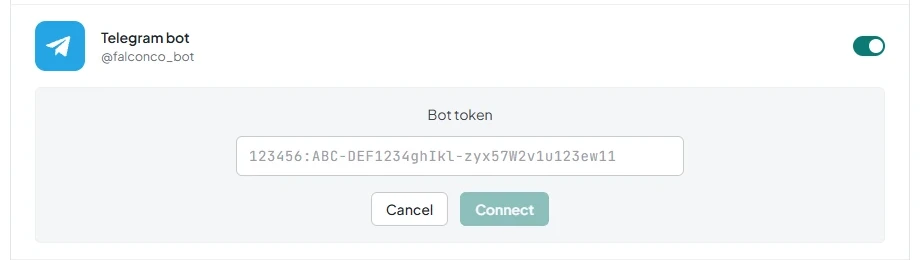
- On the Channels page, turn on the toggle in the Telegram bot row.
- Paste the token into the Bot token field. Example format: 123456:ABC-DEF...
- Click Connect. To exit without connecting, click Cancel.
Incoming text, photos, videos, voice messages, audio, documents, stickers, and quotes are supported. Reactions work in both directions. The only available delivery status is “Submitted”.
4. Set up multiple bots if needed
- To connect another bot, click Add bot.
- To choose the default bot, click Make default.
- To disconnect, turn off the toggle and click Disconnect.
If the channel loses access, for example because the bot is blocked or its token is revoked, the owner will receive a notification.
How to connect Telegram groups
5. Add the connected bot to a group
- Add the Telegram bot already connected as a source in AnyLinga to the group you want to connect.
- Grant the bot admin rights.
- In @BotFather, open Group Privacy for this bot and select Turn off.
Groups can only be connected through a bot, not a personal account.
6. Enable the group in AnyLinga
- On the Channels page, open the Groups tab.
- Find the group you added under Telegram Groups. A new group appears with its toggle turned off. Turn it on.
- If you need translation, turn on Enable Telegram group translation.
What happens after connecting
Chats arrive in Kommo from the AnyLinga source through the Telegram channel. The pipeline, stage, and responsible user are set in Processing Rules. Learn more about where chats and leads go.
Did you find this article helpful?
Get in touch
We reply during business hours.
New to AnyLinga?
Try it yourself, or we'll set it up for you when you pay for the first month.