
How to connect Telegram to Kommo: bot and personal account in AnyLinga
To connect Telegram to Kommo through AnyLinga, choose a source: a Telegram bot or an employee’s personal account. Set up the connection on the Channels page.
Below is a comparison of the options and the settings that determine where chats and leads go in Kommo. For detailed connection instructions, see each option’s page.
What you'll need
- Access to AnyLinga and your Kommo account.
- For a bot connection, a token from @BotFather.
- For a personal account, Telegram Premium for the account owner and access to Telegram on their phone.
Which to choose: a bot or a personal account
A bot works for inquiries from customers who start the conversation: a bot cannot message first. Telegram groups can only be connected through a bot. See the Telegram bot instructions.
A personal account connects through Telegram Business using an assistant bot. You do not need to enter a phone number or login code in AnyLinga. This option works only with private chats, not groups; reactions in Business chats are not supported. See the personal account instructions.
1. Open the channel list
- Go to Channels and open the Direct tab.
- In Incoming Message Sources, find Telegram bot or Telegram personal account.
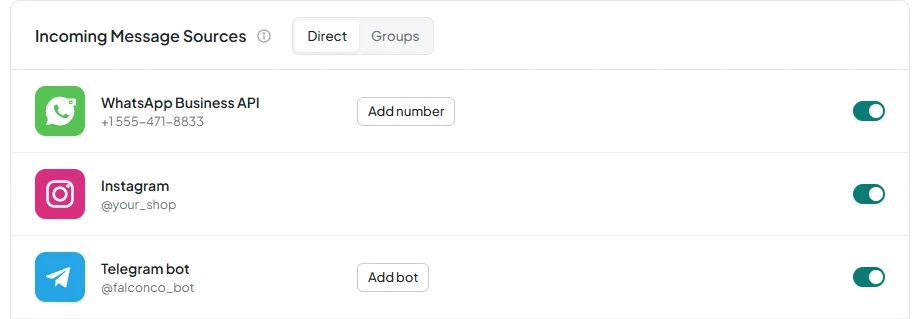
Telegram bot
To connect a bot, you need a token from @BotFather. On the Channels page in AnyLinga, paste it into the Bot token field.
Telegram groups connect through a bot that is already connected to AnyLinga as a source. For bot and group setup steps, see the Telegram bot instructions.
Telegram personal account
To connect a personal account, get a link in AnyLinga for the account owner. The owner opens it in Telegram on their phone and creates an assistant bot. Then, in @BotFather, they enable Secretary Mode and add the assistant bot to Telegram Business.
The account owner needs Telegram Premium for this connection. For detailed setup steps, see the personal account instructions.
Where chats and leads go in Kommo
Chats arrive in Kommo from the AnyLinga source through the Telegram channel. Kommo creates a lead in Incoming leads. AnyLinga then moves it to the selected pipeline and status and assigns a responsible user according to the rules.
2. Choose a pipeline and status for leads
- Open Processing Rules → Lead Routing.
- Under Pipeline, select For all sources or Per source and specify the pipeline.
- Select the Status that AnyLinga should move leads to.
3. Set up responsible user assignment
- In the Responsible user field, select No assignment, Specific user, Round-robin, or Random.
4. Set up labels for contacts and leads
- Use Source field on contact for a link in the format t.me/username.
- Set up Tag on contact and Tag on lead.
- Use the Telegram and Personal Telegram tags to identify the source.
Get in touch
We reply during business hours.
New to AnyLinga?
Try it yourself, or we'll set it up for you when you pay for the first month.