
WhatsApp ads: see which Meta ad brought a customer to Kommo
A customer messaged you on WhatsApp from a Facebook or Instagram ad. How can you tell in Kommo which WhatsApp ad started the conversation?
AnyLinga receives ad data from Meta and records it in Kommo: it adds a note and fills in source fields in the lead. Ad tracking in Kommo helps you link an inquiry to a specific ad.
What you'll need
- Kommo connected to AnyLinga.
- For WhatsApp, a WhatsApp Business API number. Numbers connected via QR code do not receive ad data.
- For Messenger or Instagram Direct, a Facebook Page or Instagram account connected to AnyLinga.
- Ad data recording is available on all plans. Building an audience of customers from ads requires Campaigns/Workspace or a trial.
How the ad source is passed
Click-to-WhatsApp ads are Facebook or Instagram ads with a button to send a WhatsApp message. When a customer messages you from one of these ads, Meta sends the ad data with the first message. AnyLinga processes it automatically.
The same process works for Click-to-Messenger and Click-to-Instagram Direct ads. Kommo saves only the ad data that Meta provides.
How to prepare your connection
1. Check the channel connection
- Make sure Kommo is connected to AnyLinga.
- Use a WhatsApp Business API number for WhatsApp ads.
- For Messenger or Instagram Direct ads, check that your Facebook Page or Instagram account is connected to AnyLinga.
2. Check whether you need to reconnect the Page
- If your Facebook Page was connected before October 16, 2026, we recommend reconnecting it in AnyLinga to receive ad data.
- You do not need to enable a separate toggle: AnyLinga automatically processes ad referrals when a customer sends a message.
What you will see in a Kommo lead
3. Find the ad note
- Open the contact's lead. AnyLinga adds a note to all of their open leads. If there are no open leads, it adds the note to the contact.
- The first line is “{{used}} of {{limit}}”. For other channels, it is “{{used}} of {{limit}}” or “{{used}} of {{limit}}”.
- The following lines are “Header”, “Body”, “Link”, and “Ad ID: …”. The ad text is limited to 300 characters.
4. Check the source fields in the lead
- In Tracking data, UTM_SOURCE is set to facebook, and UTM_MEDIUM is set to ctwa for WhatsApp, ctm for Messenger, or ctd for Instagram.
- The ad ID is saved in UTM_CONTENT, the ad headline in UTM_TERM, and the link in REFERRER.
- Use these fields in Kommo filters and source reports.
How to build an audience of customers from ads
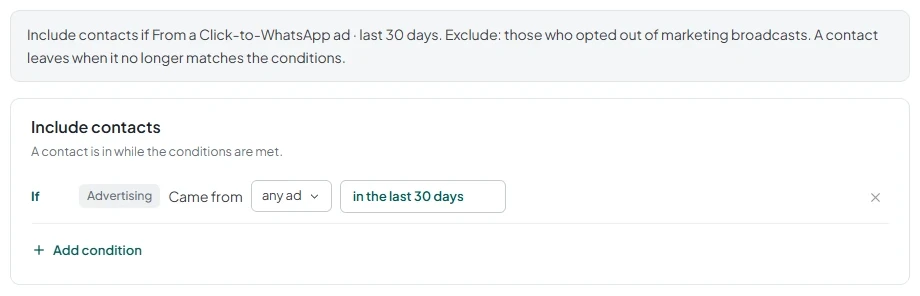
5. Create an automatic segment
- Open Audiences and create an automatic segment.
- Add the Came from a Click-to-WhatsApp ad condition.
- Select any ad or specific ads.
- Set the period: any time or in the last {{d}}.
6. Use the audience for a broadcast
- You can prepare a broadcast for this audience. Follow the steps in the broadcast to your own contact list guide.
Meta conversions
To send events when a lead moves to a stage, go to Automation → Meta conversions. A Campaigns/Workspace plan is required.
Meta's permission to send events is still pending approval. This will be covered separately soon.
Get in touch
We reply during business hours.
Already using AnyLinga?
Describe your question and we'll reply on WhatsApp or by email.
New to AnyLinga?
Try it yourself, or we'll set it up for you when you pay for the first month.