
Ads Manager shows chats
You see conversations started, but that does not tell you which chats became sales in Kommo.
META ADS TO KOMMO
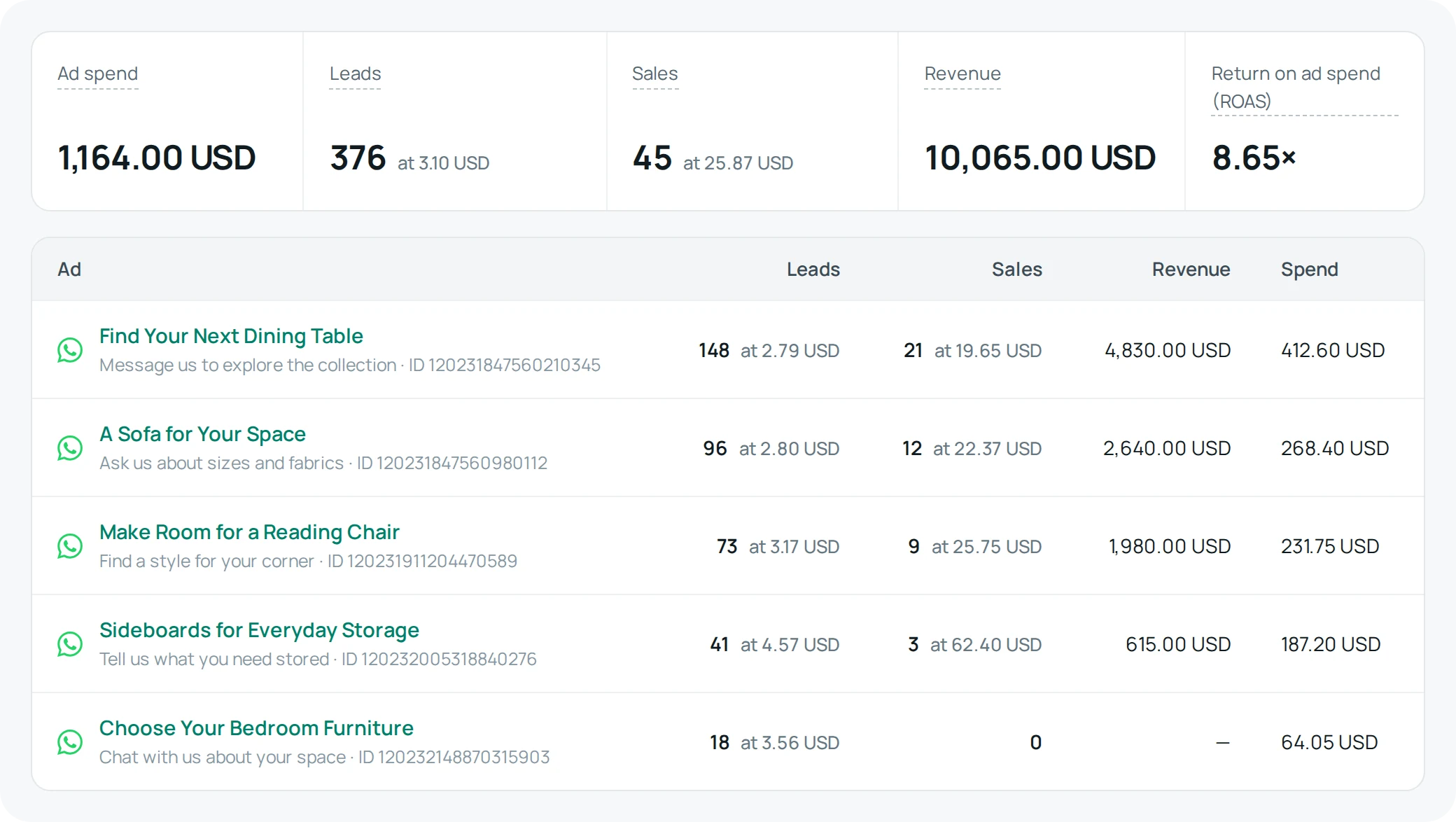
Connect your click to whatsapp ads to Kommo deals. AnyLinga shows what each ad cost and what it earned, with monthly spend, WhatsApp leads, sales and revenue in one report.
7-day trial. No credit card required.
You see conversations started, but that does not tell you which chats became sales in Kommo.
You track deals and their amounts, but need the originating ad to connect revenue to ad spend.
AnyLinga connects the ad to the deal, so you can compare each ad’s cost with the revenue it brought.
A customer taps your Meta ad and sends you a WhatsApp message.
AnyLinga records the originating ad in the customer’s Kommo deal.
You move the deal to the successful, or won, stage in Kommo.
The sale and revenue appear in the report, and AnyLinga sends a conversion to Meta.
This flow uses won as your chosen conversion stage; you can choose which deal stage triggers the conversion to Meta.
Open Meta conversions → Report in your AnyLinga account. See monthly results for each ad, with ROAS in the totals.
See the ad text, link and ad ID in the deal, plus UTM tags in the tracking fields.
Choose a deal stage to trigger a conversion. Meta learns which clicks became purchases, not only which became chats.
Build an audience of customers who wrote from a specific ad during a chosen period. Send a WhatsApp Business API broadcast. Requires Campaigns, Workspace or the trial.
The AnyLinga team sets it up for you. Standard setup is free when you pay for your first month. Message a manager in your language: text only, no calls.
Text only, no calls. Your manager replies in your language.
A lead is a unique customer who wrote from the ad. A sale is a Kommo deal that reached the successful, or won, stage. Revenue is the deal amount.
Ad spend loads automatically from your connected Meta ad account once a day. You can also enter it manually.
No. Numbers connected by QR code do not receive ad data. WhatsApp must be connected through the WhatsApp Business API.
Facebook Messenger supports ad details in the Kommo deal and conversions sent to Meta. For Instagram, ad details are saved in the CRM card only.
The report is available on every AnyLinga plan. Audiences for broadcasts require Campaigns, Workspace or the trial. The 7-day trial requires no credit card.
Revenue is converted into the report currency at the exchange rate of the day of the sale.
No. This capability supports Kommo only for now.
See which ads brought WhatsApp leads and won deals. Try AnyLinga for 7 days, with no credit card required.