
What happens if you regenerate an AI gateway token or secret
The Regenerate button changes the token or secret immediately, with no confirmation or transition period. Until you update the corresponding value in n8n, replies to customers or message processing may stop.
What changes immediately
Regenerate the token or secret if someone unauthorized has gained access to it. The Regenerate and Copy buttons are next to the Callback token and Signing secret (X-AnyLinga-Signature) fields on the Connect your AI page.
The Callback URL is not regenerated.
What stops working
If you regenerate the Callback token, the old token stops working immediately. All replies from n8n to callback_url and requests to /api/connect/send will receive 401 until you update the token in n8n. This also applies to replies to messages sent to n8n before the token changed. Customers will not receive replies during this time.
If you regenerate the Signing secret (X-AnyLinga-Signature), X-AnyLinga-Signature verification in the workflow will fail until you update the secret in n8n. If the workflow rejects requests with an invalid signature, it will stop processing messages.
How to change the value safely
1. Open the n8n workflow and AI gateway settings
- Open the n8n workflow where you need to replace the token or secret in advance.
- In AnyLinga, go to Tools & Settings → AI gateway and open the Connect your AI page.
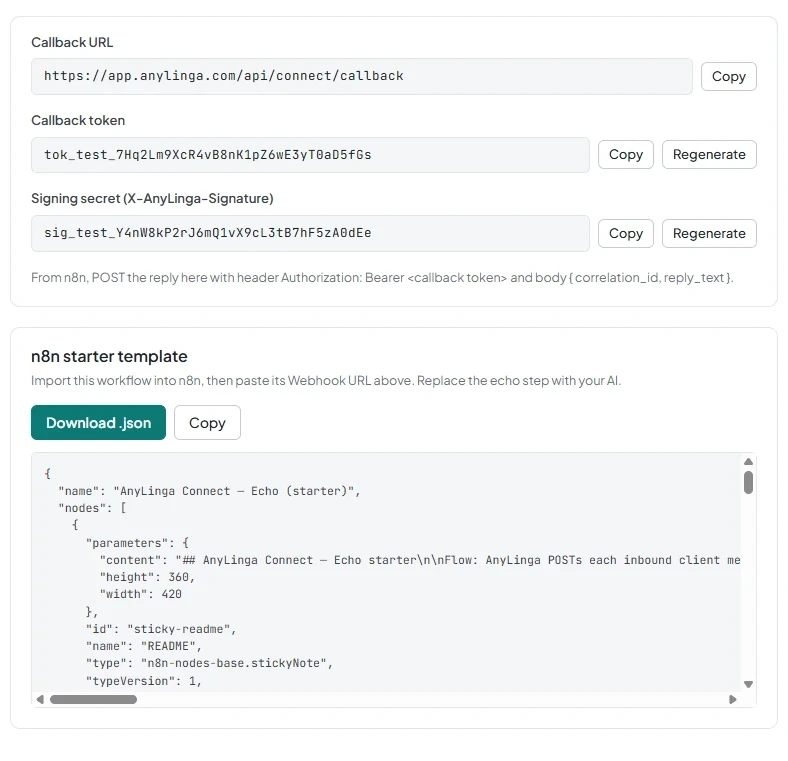
2. Regenerate the value you need
- Click Regenerate next to the Callback token or Signing secret (X-AnyLinga-Signature) field.
3. Replace the value in n8n immediately
- Click Copy next to the changed field.
- Replace the corresponding value in the n8n workflow.
4. Check that the customer receives the reply
- Send a real message.
- Check that the reply reaches the customer.
Related questions
How to connect an AI agent through n8n · Why the reply does not reach the customer · Which fields the workflow receives
Get in touch
We reply during business hours.
New to AnyLinga?
Try it yourself, or we'll set it up for you when you pay for the first month.