
What is AnyLinga, and how do you get started?
Need WhatsApp integration with your CRM or other messaging apps in Kommo? AnyLinga sends customer chats to Kommo so your team can reply from the CRM.
This article explains what AnyLinga is, where to connect Kommo and your first channel, and how message translation, broadcasts, and plans work.
What you'll need
- An AnyLinga account: sign up and log in.
- The Kommo account you want to connect.
- A WhatsApp number, bot, or messaging account for your first channel.
What AnyLinga does
AnyLinga connects messaging apps to Kommo: customer messages arrive in the CRM, where your team can read and reply to them. You can connect multiple numbers and accounts from the same messaging app.
Messages can be translated. The Campaigns and Workspace plans support WhatsApp broadcasts. Workspace also includes messaging in Inbox—with or without a CRM.
1. Choose where to start
- To message customers from Kommo, start by connecting your CRM and first channel on the Channels page.
- If you need translation, choose a model under Settings → Language & Time: DeepL · fast (~0.3s) or ChatGPT · accurate (~2s).
- Set the team member's language under Translation. The default list includes Russian, English, Spanish, Portuguese, German, French, Italian, Indonesian, and Turkish.
- For details, see How translation works.
How the dashboard is organized
2. Open the “Channels” page and connect Kommo
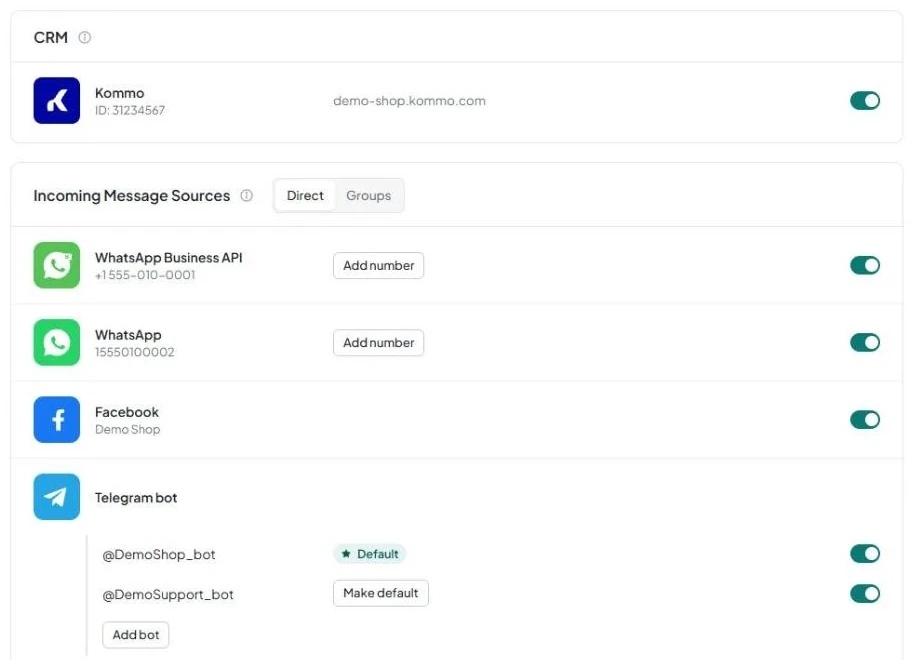
- The main dashboard page is Channels. It contains the CRM block with the hint Where do messages go? and the Incoming Message Sources block with Direct and Groups tabs.
- In the CRM block, choose the Kommo row and follow How to connect Kommo. Before connection, Kommo appears first, followed by amoCRM.
- Once connected, the block displays IDs and your Kommo account address: <subdomain>.kommo.com.
- If you see the yellow Click "Save" in widget settings button, click it to open <subdomain>.kommo.com/settings/widgets/, then click Save in the widget settings.
3. Find the section you need in the sidebar
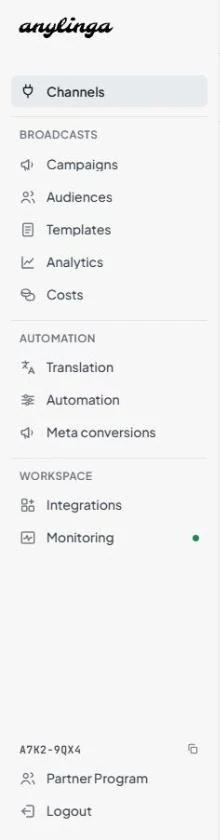
- Support and Settings are at the top of the menu. Use Channels to connect your CRM and messaging apps.
- The Broadcasts section contains Campaigns, Audiences, and Templates. When broadcasts are enabled, Analytics and Costs appear.
- The Automation section contains Translation, Automation, and Meta conversions.
- The Workspace section contains Integrations and Monitoring.
- Use Integrations to connect your own AI through n8n, not to connect a CRM or channels. See AI agent through n8n.
Which messaging apps you can connect
On the “Channels” page, select an incoming message source on the “Direct” tab. Instructions vary by messaging app and connection method.
4. Choose and connect your first channel
- WhatsApp—a personal number connected by QR code: WhatsApp via QR code.
- WhatsApp Business API—Meta's official API: WhatsApp Business API.
- Instagram and Facebook: Instagram and Facebook.
- Telegram bot and Telegram personal account: Telegram.
- WhatsApp and Telegram group chats are set up on the Groups tab.
Plans, channel pricing, and the trial period
The total cost includes the plan fee and connected channels. Each higher plan includes the features of the previous plan. The number of team members does not affect the price.
5. Check the trial terms
- The trial lasts 7 days and includes up to 5 channels and 1,000 translations, with broadcasts and Inbox enabled.
- The Channels page displays a counter, for example: 1 of 5 trial channels in use.
- To get started, sign up, connect Kommo, then add your first channel using the instructions above.
6. Open billing and choose a plan
- Go to Settings → Billing, then open Subscription and payment.
- Integration—$0 per month: connects messaging apps to your CRM.
- Campaigns—$19 per month: CRM and broadcasts, including audiences, templates, scheduling, and statistics.
- Workspace—$39 per month: broadcasts and messaging in Inbox—with or without a CRM.
- Each channel costs $21 per month in addition to the plan fee. Pay for 6 months to get a 10% discount, or for a year to get a 16.67% discount.
7. Check translation limits
- The subscription includes 3,000 translations per month for the first channel and 1,000 more for each additional channel.
- One translation equals one credit, regardless of message length. Learn more about translation credits.
- Group chats are not limited by your plan.
- See the subscription terms on the pricing page and in Plans and billing.
Get in touch
We reply during business hours.
Already using AnyLinga?
Describe your question and we'll reply on WhatsApp or by email.
New to AnyLinga?
Try it yourself, or we'll set it up for you when you pay for the first month.