
What is the Zoho API limit, and what can you do when it runs low?
The Zoho API limit is the number of API requests available to your organization in 24 hours. AnyLinga works with Zoho through the API: if credits run out, messages will still arrive in Inbox, but Zoho updates will be skipped. You can wait for credits to become available or increase your limit with Zoho.
You can check AnyLinga's own usage and your organization's calculated limit in your AnyLinga account.
What you'll need
- An AnyLinga account with Zoho CRM connected.
- Your Zoho edition and number of licenses to check the calculated limit.
- Details of other integrations and extra credits purchased to estimate total usage.
How to check the limit and understand the figures
1. Open the API usage indicator
- In your AnyLinga account, open Channels and find the Zoho CRM row.
- Below it, you will see the gray text N of M Zoho API credits in 24 h and a thin bar.
- Hover over the i icon next to it to open the Zoho API limit tooltip.
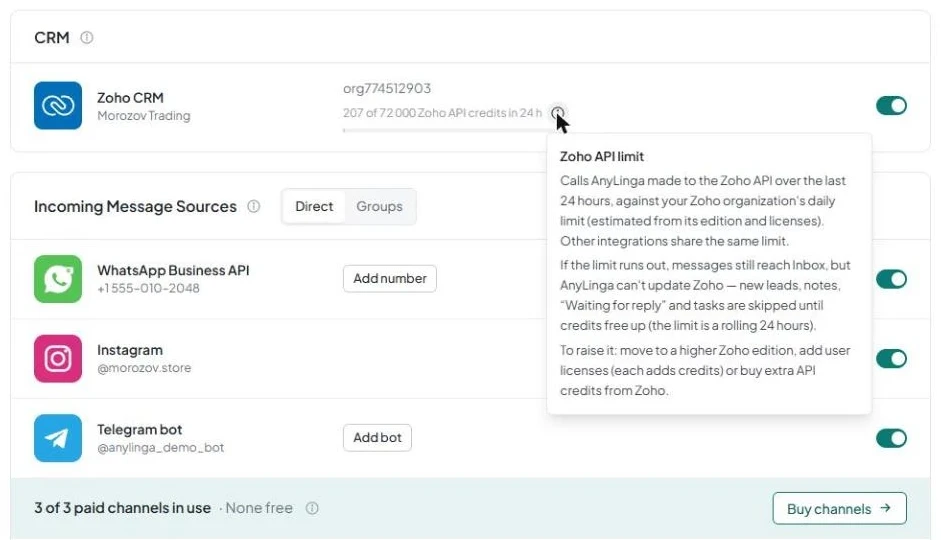
2. Compare usage with the calculated limit
- N is the number of requests made by AnyLinga itself in the last 24 hours.
- M is your Zoho organization's daily limit, calculated from your edition and number of licenses.
3. Check the reference limit for your edition
- According to the Zoho API v8 documentation, the Free edition has a limit of 5,000 credits.
- Standard: 50,000 + 250 per license; Professional: 50,000 + 500 per license.
- Enterprise and Zoho One: 50,000 + 1,000 per license.
- Ultimate and CRM Plus: 50,000 + 2,000 per license. For example, a CRM Plus trial with 11 licenses has 72,000 credits.
4. Note the warning and what happens when credits run out
- At 70% usage and above, the row shows a warning: Close to the daily Zoho API limit. A higher Zoho edition or extra API credits bought in Zoho raise it.
- If the limit is reached, messages will still arrive in Inbox.
- AnyLinga will not be able to update Zoho: creating new leads, adding notes and tasks, and updating Waiting for reply will be skipped until credits become available.
How to increase the Zoho API limit
Upgrade to a higher Zoho edition or add user licenses: each license adds credits based on your edition.
Another option is to buy extra API credits from Zoho. Remember that purchased credits are not included in the indicator's calculation in AnyLinga.
If you do not increase the limit, you need to wait for credits to become available within the rolling 24-hour window. Until then, messages will arrive in Inbox, but Zoho updates will be skipped.
Related questions
connect Zoho CRM · what happens when a new client messages you · AnyLinga settings for Zoho
Get in touch
We reply during business hours.
New to AnyLinga?
Try it yourself, or we'll set it up for you when you pay for the first month.