
How to set up an automatic audience using Zoho data
In your AnyLinga account or the AnyLinga Broadcasts tab in Zoho, open Audiences, click Create audience, and select an automatic segment. Set conditions based on Zoho data and save the rules. The segment will automatically add and exclude contacts.
What you'll need
- Your AnyLinga account or the AnyLinga Broadcasts tab in Zoho.
- Conditions for selecting contacts based on Zoho data.
- The pipeline and relevant stages, if you are selecting contacts based on deals.
Set conditions for the automatic segment
1. Create an automatic segment
- In your AnyLinga account or the AnyLinga Broadcasts tab in Zoho, open Audiences.
- Click Create audience and select an automatic segment.
2. Add conditions based on Zoho data
- Open the Conditions tab and click Add condition.
- In the CRM group, select the condition you need: Pipeline and stage, Responsible user, Tags, Deal amount, or Field value.
- You can also use Zoho data to select contacts by lead status and source.
- For the Pipeline and stage condition, first select a pipeline, then its stages.
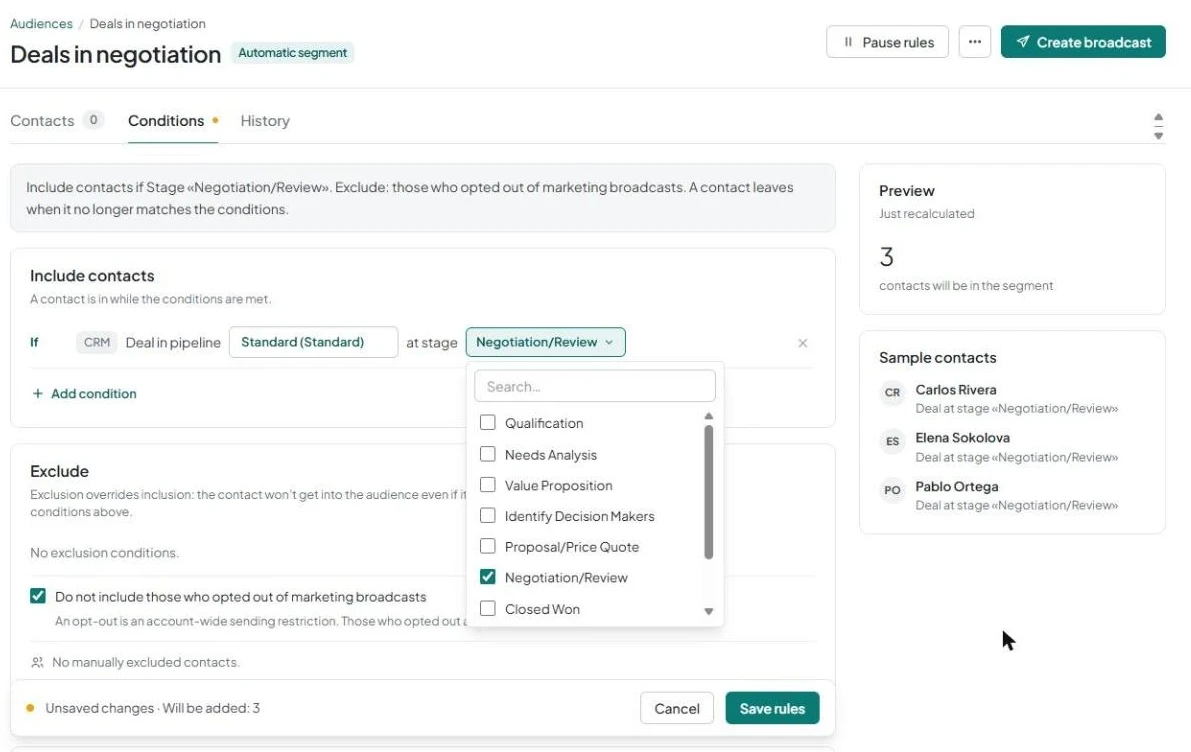
3. Check exclusions and save the rules
- In the Exclude block, the Do not include those who opted out of marketing broadcasts checkbox is selected.
- Click Save rules.
Check the recalculation results
After you save the rules, AnyLinga will load the Zoho data and recalculate the audience in seconds. The Preview block will show Recalculating the audience… with an animation, then automatically display the contact count and Sample contacts.
A contact leaves the segment when they no longer meet the conditions. Contacts who meet the conditions are also added automatically.
To prepare a broadcast for the segment, click Create broadcast. You can also trigger sending when a contact joins the audience. Learn more in reminders and repeat offers based on CRM data.
Related questions
Audience from Zoho records · WhatsApp broadcast from Zoho
Get in touch
We reply during business hours.
New to AnyLinga?
Try it yourself, or we'll set it up for you when you pay for the first month.