
How to start a chat with a client from a Zoho record
To message a client first from Zoho CRM, click Send message in the header of a lead, contact, or deal record. If there is no conversation yet, Start a chat opens with the phone number and name from the record. Choose a channel and write your message.
What you'll need
- Open Zoho CRM.
- Find the lead, contact, or deal record.
- To send the first message through WhatsApp Business API to a client who has not messaged you in the last 24 hours, prepare a template approved by Meta.
How to open a conversation and send a message
1. Click Send message in the record
- In the record header, click Send message. The button is next to Send Email, Convert, and Edit.
- In a deal record, the button opens a conversation with the deal's contact.
- The Send message button is also available in task records.
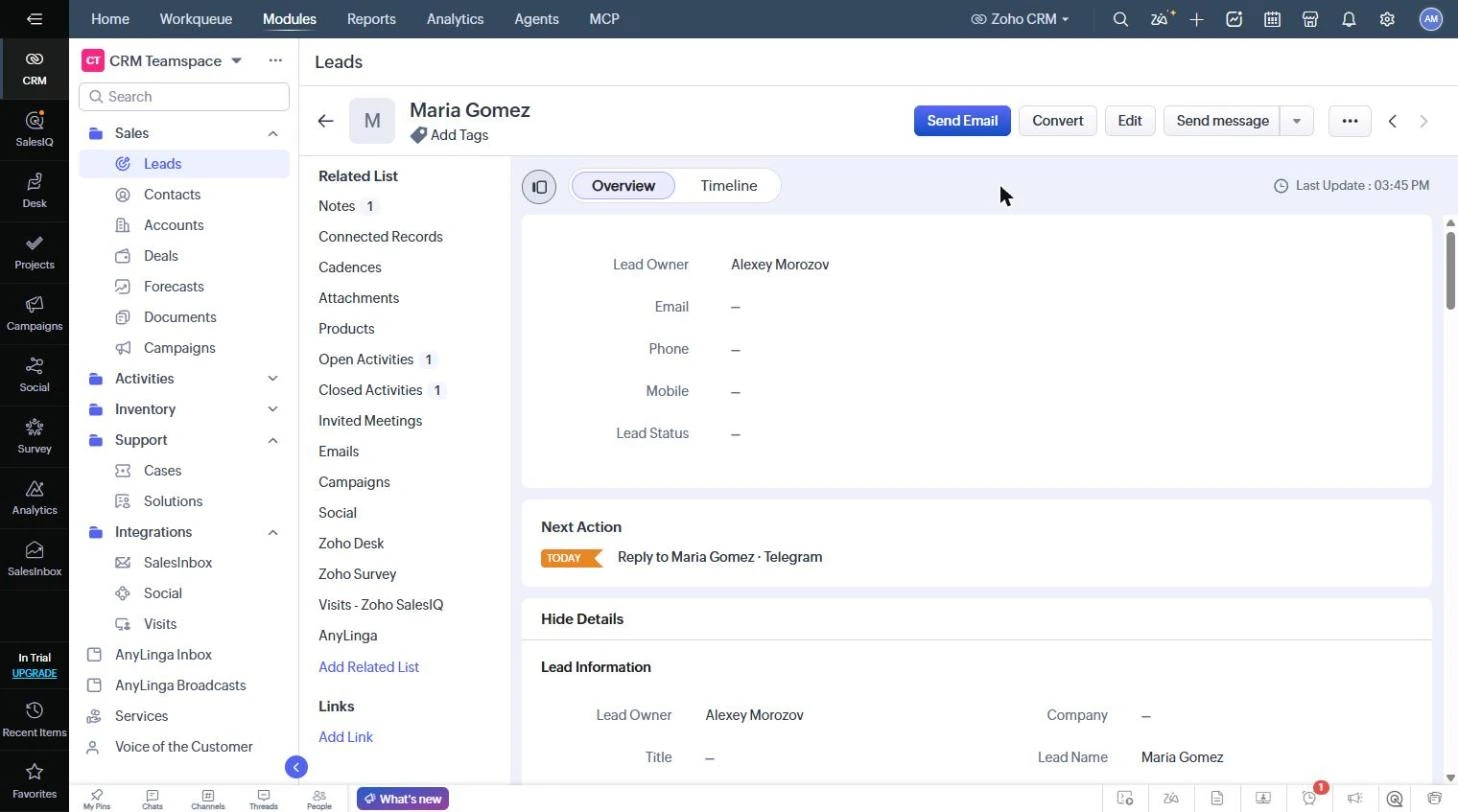
2. Choose a channel and message the client
- If you already have a conversation with the client, that conversation opens.
- If there is no conversation yet, Start a chat opens with the phone number and name from the record.
- Choose a channel and write your message.
With WhatsApp Business API, the first message to a client who has not messaged you in the last 24 hours must use a template approved by Meta. Learn more: WhatsApp message templates.
Related questions
reply to a client from Zoho · where to view client messages
Did you find this article helpful?
Get in touch
We reply during business hours.
New to AnyLinga?
Try it yourself, or we'll set it up for you when you pay for the first month.